

Key Take aways for CoS number
- A CoS number is always 11 characters starting with "C". Any deviation is a red flag worth querying before applying.
- Workers cannot check CoS status in the SMS directly; only your sponsoring employer has SMS access.
- A correctly formatted CoS number does not confirm the CoS is valid; status, expiry, and job details all need separate verification.
- HR teams must ensure the CoS status is "Assigned" (not just Created) before sharing the number with the employee.
- Errors in CoS details like wrong SOC code, salary mismatches, or personal data mistakes can cause visa refusals that delay start date of employee.
If you need to do a CoS check in the UK, confirming a Certificate of Sponsorship number is correctly formatted, assigned, and valid before a visa application, this guide walks HR teams and sponsored workers through every check.
What Is a CoS Number?
A Certificate of Sponsorship (CoS) number is an 11-character unique reference code beginning with the letter "C" for example, C12345678901. It is generated by a UK-licensed employer through the Home Office Sponsor Management System (SMS) once a CoS has been formally assigned to a worker.
This reference number is not on a physical document. The CoS exists entirely as a digital record within the Home Office system. Your employer shares the CoS number with you directly so you can enter it into your UK visa application.
CoS Check UK: How to Check a Certificate of Sponsorship
A full CoS check in the UK means confirming four things, not just the number:
- Format: the number is 11 characters and starts with "C".
- Status: the CoS shows "Assigned" (not Created, Used, Withdrawn or Cancelled) in the Sponsor Management System.
- Details: job title, SOC code, salary and dates match the offer and meet UKVI thresholds.
- Sponsor: the employer appears on the Home Office Register of Licensed Sponsors.
Workers can check the format themselves; only the sponsoring employer can check status in the SMS.
Why the CoS Number Matters for Your Visa Application
When sponsoring a worker under the UK Skilled Worker route, the Certificate of Sponsorship (CoS) number is the critical reference that connects the employee’s visa application to your organisation’s sponsorship record. UK Visas and Immigration (UKVI) uses this unique identifier to retrieve key assignment details from the Home Office system, including the job title, salary, SOC code, assignment start date, and CoS validity period.
If the CoS number is entered incorrectly, does not follow the required format, or has not yet been assigned to the worker, the visa application cannot be processed correctly. This can result in delays, requests for additional information, or even a visa refusal, regardless of whether all other supporting documents are in order.
How to Find Your CoS Number
Once a Certificate of Sponsorship (CoS) has been assigned, employers should ensure that the sponsored worker receives the correct CoS reference number. This information is typically shared through:
- The employment contract or offer letter, where some employers include the assigned CoS reference.
- An official communication from the HR, mobility, or immigration team responsible for managing sponsorship.
- Supporting guidance provided to the employee during the visa application process, as the CoS reference must be entered into the relevant field of the UK Skilled Worker visa application.
Employers should communicate the CoS number directly to the sponsored worker and avoid relying on third parties to relay this information. If a CoS has been assigned but the employee has not received the reference number, the sponsoring organisation should provide it promptly to prevent delays in the visa application process.
How to Check a CoS Number Format Is Valid?
Before a sponsored worker submits their visa application, employers should verify that the assigned CoS number meets the following requirements:
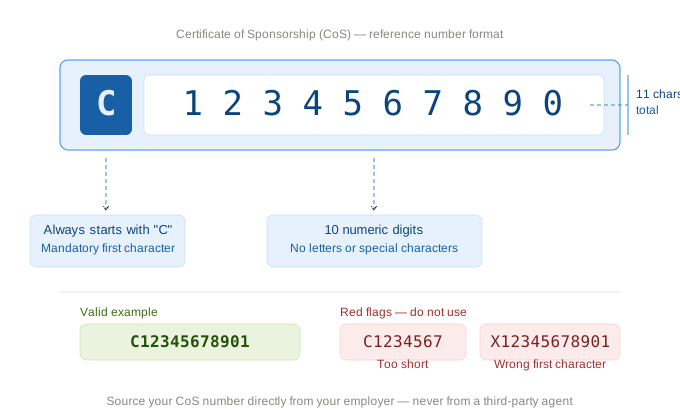
CoS Number Check: Format Checklist
Once you have your number, you should also learn how to verify a UK CoS is genuine to protect yourself from fraud.
How to Check if a UK Sponsor Is Licensed
Before relying on a CoS, confirm the employer is a licensed sponsor. Search the employer's name on the Home Office Register of Licensed Sponsors (published on GOV.UK). If the company isn't listed, or its rating shows an issue, treat the CoS as a red flag and query it before applying.
Can Employees Check CoS Status Directly Online?
No, the employees cannot check CoS status online as they cannot access the Sponsor Management System (SMS) directly. The SMS is an employer-facing portal, and only licensed sponsors with Level 1 SMS user access can view and manage CoS records.
Employers can help minimise visa delays and errors by ensuring that sponsored workers have accurate and complete Certificate of Sponsorship (CoS) information before they apply. Key checks include:
- Confirming the CoS status in the Sponsor Management System (SMS). Only CoS records with an "Assigned" status can be used in a visa application.
- Maintaining an active sponsor licence and ensuring compliance with Home Office sponsorship requirements.
- Providing the worker with the key CoS details, including the job title, SOC code, salary, and assignment and expiry dates, so these can be cross-checked against the employment contract and visa application.
Proactively verifying these details helps ensure that the visa application accurately reflects the sponsorship record held by the Home Office, reducing the risk of processing delays or refusals.
What the CoS Number Does NOT Tell You
A correctly formatted CoS number confirms the reference exists but it does not confirm the CoS is valid, assigned, or free from errors. You still need to verify
- The CoS status is "Assigned" (not Created, Used, Withdrawn, or Cancelled)
- The expiry date has not passed (defined CoS expire within 3 months of assignment)
- Personal details such as name, passport number, and date of birth are accurate
- Salary and job details meet UKVI thresholds
For a full verification process, see our guide on UK CoS allocation and assignment.
What HR Teams Should Know About CoS Numbers
For HR managers and global mobility teams, issuing a CoS through the Sponsor Management System is the step that generates the CoS number. Before the number is available to share with the worker:
- The CoS must be fully completed within the SMS with accurate job and personal detail.
- It must be formally assigned not just saved as a draft.
- The correct CoS type must be used: Defined CoS for overseas applicants, Undefined CoS for in-UK applicants.
Related Read:
Find Answers to y our common and complex questions around Certificate of Sponsorship process in our detailed CoS guide
Errors at this stage including wrong SOC code, salary below going rate, mismatched personal details can invalidate the CoS and can cause visa refusals.
Jobbatical manages the full CoS assignment process to ensure accuracy before the number is issued.
Disclaimer: Immigration rules change quite frequently; please verify with official sources or contact us for the latest info before making any decisions.
┈┈┈┈┈┈┈┈┈┈┈┈┈┈┈┈┈┈┈┈┈┈┈┈┈┈┈┈┈┈┈┈┈┈┈┈┈┈┈┈┈┈┈┈┈┈┈
Frequently Asked Questions : CoS Number UK

.svg)
.svg)