.svg)



Key Take aways for SMS portal
- Your SMS login ID arrives by post to the Authorising Officer and your password by email to the Level 1 user if either is missing, contact UKVI within 10 working days.
- Three failed login attempts trigger a 30-minute lockout; password resets go to the registered email and expire quickly.
- The SMS message board is UKVI's official channel for contacting your organisation, unread messages can constitute a compliance breach.
- New HR managers inheriting an SMS with no handover must audit active users, verify mobile numbers, and check the message board for outstanding Home Office communications.
- If the previous Level 1 user has left and credentials are lost, contact UKVI's helpline, never share or reuse another user's credentials.
What is the UK Sponsor Management System portal?
The Sponsor Management System (SMS) is the Home Office's secure online portal for licensed UK employers. It is the single point of contact between your organisation and UK Visas and Immigration (UKVI). Every sponsorship action, from issuing a Certificate of Sponsorship (CoS) to updating company details, happens here.
This guide focuses on the operational layer: how to get in, what to do when access fails, how to read the message board, and what to do if you have inherited SMS responsibility with no documentation. For compliance duties, reporting deadlines, and audit preparation, see our UK SMS HR best practices guide.
How your SMS credentials are issued
When your sponsor licence is approved, UKVI sends your login credentials through two separate channels, intentionally split for security:
- The login ID is posted by physical letter to the Authorising Officer named in your licence application.
- The initial password is emailed to the nominated Level 1 user.
The Authorising Officer is then responsible for passing the login ID to the Level 1 user. This split delivery is by design neither piece is useful without the other.
If either has not arrived within 10 working days of your licence being approved, contact the UKVI Sponsorship, Employer and Education helpline. Do not wait, delayed access means delayed CoS assignments and stalled visa applications.
If you add a new Level 1 or Level 2 user later, their password is sent to their email address once an existing Level 1 user approves the request inside the portal.
Logging in for the first time: What to expect
First-time login is slightly different from routine access. Here is what happens:
- Go to the official SMS login page on GOV.UK. Bookmark it directly, do not save links from emails or third-party sites.
- Enter your login ID and temporary password exactly as issued. Both fields are case-sensitive.
- You will be prompted to set a new password immediately. It must be 12 to 256 characters and include at least one uppercase letter, one lowercase letter, one number, and one special character. Spaces are not permitted, and your password cannot include your username or login ID.
- A one-time passcode (OTP) will be sent by text to the mobile number registered against your account. Enter it within the time window shown, OTPs expire within minutes.
- Level 1 users land on the message board after login. Read all messages before doing anything else.
Treat your credentials with the same care you would apply to online banking. They must not be shared with anyone, colleagues who need to carry out SMS tasks require their own user accounts.
The SMS message board: UKVI's direct line to your organisation
The message board is accessible only to Level 1 users, and it is the Home Office's primary method for communicating with your organisation. UKVI uses it to send:
- Compliance notices and requests for information
- Notifications about your licence status
- Policy updates affecting your sponsorship duties
- Priority service availability and capacity announcements
Missing a message is not treated leniently. If UKVI requests evidence via the message board and receives no response, this can be recorded as a compliance failure, even if the reason was simply that no one logged in to check.
Level 1 users must read all messages every time they log in. Most advisors recommend checking at least two to three times per week. If your organisation has only one Level 1 user and they are on leave or have left, the message board goes unmonitored — which is why maintaining a second active Level 1 user is essential.
Common SMS access errors and how to fix them
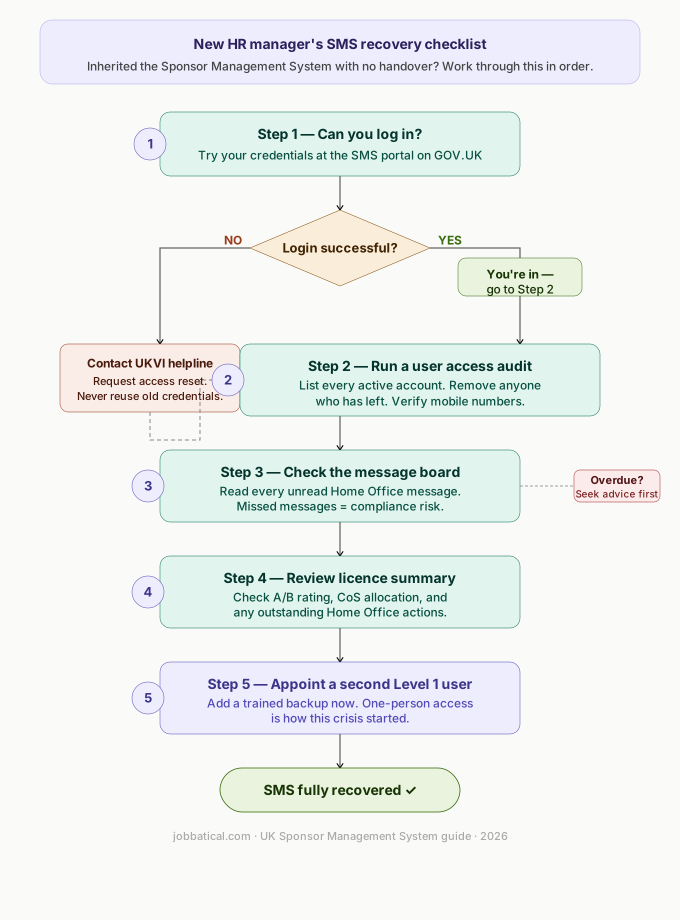
Inheriting SMS access with no handover: A step-by-step recovery plan
A common and stressful scenario:
You have taken on HR responsibility, the previous manager has left, SMS credentials are unknown, and there is no record of what has or has not been done in the system. Work through this in order.
Step 1: Establish whether you can get into the portal at all
Check whether you were already set up as a user before the previous manager left. If so, your credentials will have been emailed to you when your account was created. If not, ask the Authorising Officer who may still have access to add you as a new Level 1 user from within the portal.
If the Authorising Officer has also left and no active Level 1 user exists, contact the UKVI Sponsorship, Employer and Education helpline. Explain your situation clearly. They can guide you through the recovery process, which typically requires identity verification and evidence of your role. Do not attempt to use or recover the previous employee's credentials.
Step 2: Run a user access audit immediately
Once you are logged in, go to the user management section and list every active account. Remove access for anyone who is no longer employed or no longer in a role that requires SMS access. Former employees with active permissions are among the first things UKVI checks during a compliance visit. Verify that the mobile number registered against each remaining user is current.
Step 3: Check the message board before anything else
Read every unread message. Outstanding Home Office communications may require urgent action. Note the dates on any requests , if deadlines have already passed, seek specialist advice before responding rather than submitting a late response without context.
Step 4: Review the licence summary screen
The licence summary shows your current A or B rating, your CoS allocation, and any outstanding actions flagged by the Home Office. Cross-reference this against your internal HR records to identify any sponsored workers who may not be correctly reflected in the system.
Step 5: Appoint a second Level 1 user
The single point of failure you just recovered from must not happen again. Add a second trusted, trained employee as a Level 1 user now. This ensures continuity during leave, illness, and future staff changes. For how to structure your team and manage the SMS at scale, see our SMS HR best practices guide.
If your organisation sponsors 10 or more workers, dedicated team structures and workflow integration become even more important , our guide to managing multiple sponsored workers in the SMS covers this in detail.
When to fix it yourself vs when to call the UKVI helpline
Self-service fixes inside the portal
Contact the UKVI helpline
If SMS access issues are delaying CoS assignments or causing you to miss reporting windows, the consequences escalate quickly. Jobbatical can be appointed as an additional Level 1 user on your licence, managing day-to-day portal activity on your behalf while your team focuses on hiring. Book a demo to see how this works in practice.
.svg)
Keeping your SMS credentials secure: the non-negotiables
The Home Office actively checks for credential sharing during compliance audits. A few firm rules to embed into your process:
- Every user must have their own login. No exceptions, no workarounds.
- Treat credentials like online banking access , do not store them in shared documents, spreadsheets, or group inboxes.
- Remove access the same day a user leaves or changes role. Build this into your offboarding checklist.
- Keep mobile numbers current for every active user. An outdated number blocks OTP delivery and can lock your organisation out of the portal entirely.
- Access the portal only from secure, company-managed devices and connections.
For a complete view of your ongoing sponsor duties beyond portal access including what to do in the system and when see our UK Sponsor Management System best practices guide.
Disclaimer: Immigration rules change quite frequently; please verify with official sources or contact us for the latest info before making any decisions.
Frequently Asked Questions : UK Sponsor Management System Portal
What is the URL for the UK Sponsor Management System login?
The official SMS login page is hosted on the Home Office portal at GOV.UK. Always access it directly from GOV.UK or a bookmark you created yourself — never follow links from emails or third-party sites, as phishing attempts targeting sponsor licence holders do occur.
How do I get my SMS login credentials for the first time?
Once your sponsor licence is approved, UKVI sends the login ID by post to the Authorising Officer and the initial password by email to the nominated Level 1 user. The Authorising Officer must then pass the login ID to the Level 1 user. If either has not arrived within 10 working days of licence approval, contact the Sponsorship, Employer and Education helpline.
What happens if I enter my SMS password incorrectly three times?
Your account is locked for approximately 30 minutes after three failed login attempts. You can either wait for the lockout to expire and try again, or use the forgotten password option on the login page to request a reset. The reset email is time-sensitive — use it promptly and check your spam folder if it does not arrive within a few minutes.
What is the SMS message board and how often should I check it?
The SMS message board is UKVI’s official channel for communicating directly with your organisation — it is where the Home Office sends compliance notices, requests for information, and policy updates. Only Level 1 users can access it. UKVI expects Level 1 users to read all messages before proceeding with other portal tasks each time they log in. Most compliance advisors recommend logging in at least two to three times per week.
What should I do if I have inherited SMS access with no handover from the previous HR manager?
Start by logging in and running a full user access audit — check who has Level 1 and Level 2 access, verify all listed users are still employed, and remove any leavers immediately. Then check the message board for outstanding Home Office communications. If the previous Level 1 user’s credentials cannot be recovered, contact the Sponsorship, Employer and Education helpline. Do not share or reuse another person’s credentials.
Why am I not receiving the SMS one-time passcode (OTP)?
The OTP is sent to the mobile number registered against your user account in the SMS. If you have changed your phone or number since the account was set up, the code will go to the old number. A Level 1 user must update the mobile number in the system before the affected user can log in again. If no active Level 1 user can access the portal to make this change, contact the Sponsorship, Employer and Education helpline directly.
Can I share my SMS login credentials with a colleague?
No. Sharing SMS credentials is explicitly prohibited and is a compliance violation the Home Office actively checks for during audits. Every user must have their own login. If a colleague needs access, a Level 1 user must create a new account for them directly within the portal, assigning the correct role — Level 1 or Level 2 — based on what tasks they need to perform.

.svg)
.svg)