

KEY TAKEAWAYS
- Employers cannot edit an assigned Certificate of Sponsorship; the SMS locks the record the moment it's assigned
- Minor, single-field errors (a typo in the name, one wrong digit in a date of birth) go through a sponsor note, not an edit
- Errors in the occupation code, sponsorship route, route sub-category, or 2+ of nationality/DOB/surname force a full withdrawal and reissue
- Level 1 SMS users can note any assigned CoS; Level 2 users are restricted to CoS they personally assigned or were transferred
- Every correction, note or reissue, needs a dated audit trail in your Appendix D compliance file
Your Level 1 user has just assigned a Certificate of Sponsorship (CoS), but then notices a typo in the worker’s surname. The first thought is usually to go back and correct it; but that’s not possible. Once a CoS is assigned in the Sponsor Management System (SMS), it is locked and can no longer be edited.
The Short Answer
You cannot amend an assigned Certificate of Sponsorship. Once it moves from "unassigned" to "assigned" status in the SMS, the original fields are frozen. From that point, you have exactly two options:
- Add a sponsor note to the existing CoS, for minor, single-field errors.
- Withdraw the CoS and issue a new one, for anything the Home Office treats as a substantive change.
There is no middle option, and no way to ask UKVI to edit a live CoS on your behalf.
When Can a Sponsor Note Be Used on a Certificate of Sponsorship?
A sponsor note is a short written note that your organisation adds to an already assigned Certificate of Sponsorship (CoS) in the Sponsor Management System (SMS). It is used to explain a small mistake, provide a clarification, or add extra information that UK Visas and Immigration (UKVI) may need when reviewing the visa application.
- A sponsor note does not change the original CoS.
- The original details such as the worker’s name, date of birth, salary, and job information remain exactly as they were entered.
- The note is simply added alongside the CoS to explain the mistake or provide extra context.
- UKVI caseworkers use the sponsor note when reviewing the visa application, so it should be clear, accurate, and specific.
Which CoS Errors Can Be Corrected Without Issuing a New Certificate?
Sponsor notes are built for genuinely minor, single-field slips, not for anything that changes who is being sponsored or under what terms. Typical examples:
- A mistyped name (one character, spelling variant, missing middle name)
- A single incorrect digit in the date of birth
- An incorrect start date that still falls within the CoS validity window
- Missing context the Home Office needs, such as confirming a resident labour market test or an occupation-code condition
If fixing requires touching only one identity field, or adding explanatory context, a sponsor note usually covers it. If it touches the substance of the sponsorship, it doesn't.
Which CoS Errors Require Withdrawal and Reissue?
Some mistakes are too significant for a note. You must withdraw the CoS and assign a new one if the error involves any of the following:
- The occupation code (SOC code)
- The sponsorship route itself (for example, Skilled Worker versus a different route)
- The route sub-category
- More than one of: nationality, date of birth, or surname, together on the same record
Withdrawing and reissuing isn't a quiet fix. It resets the worker's three-month application window, and may mean paying the CoS fee again. If they've already applied on the flawed CoS, you'll need to coordinate with them directly, since a new reference number changes what's on file with UKVI.
Sponsor Note vs New Certificate of Sponsorship: Which Should Employers Choose?
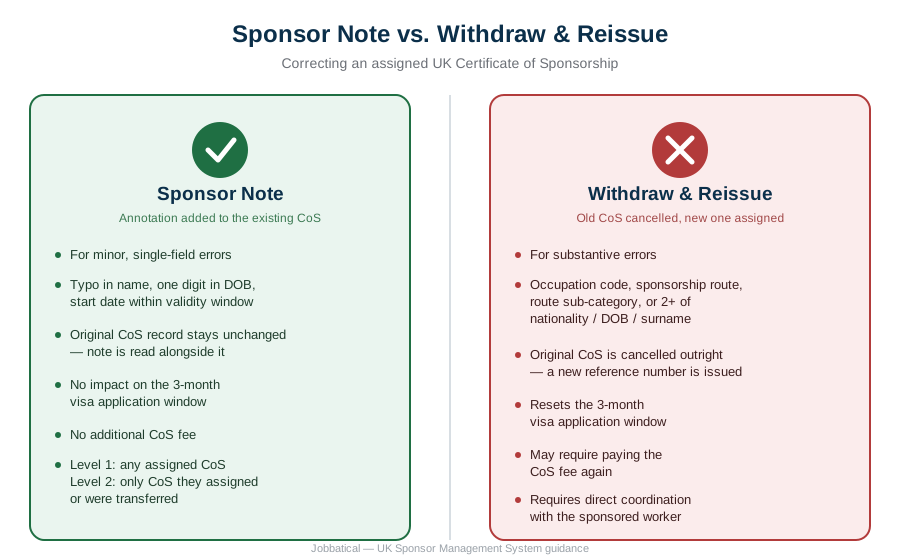
How Do Sponsors Add a Sponsor Note in the SMS?
- Log into the SMS and open Manage Live Certificates.
- Select the assigned CoS that needs the correction.
- Click Sponsor Note at the bottom of the record.
- Enter the correction or clarification in the free-text field, stating clearly what was wrong and what the correct detail is.
- Save. The updated record now shows the note attached to the original CoS.
Access depends on your SMS user level. Level 1 users have full SMS access and can add a note to any CoS the organisation has assigned. Level 2 users are restricted to CoS they personally assigned, or ones transferred to them, and can't touch anything outside that scope. If the correction sits on a CoS assigned by someone else, a Level 2 user will need a Level 1 colleague to step in.
Can You Edit a Certificate of Sponsorship Before It Is Assigned?
This entire problem disappears if you catch it earlier. Before assignment, the SMS still shows a live "amend" option on an unassigned CoS, so you can correct any field directly, no note, no reissue, no reset. The moment you click assign, that option vanishes for good. Building a second sign-off check before assignment, not after, is the cheapest fix available.
Decision at a Glance
Use this as a quick triage step, not a substitute for checking the field against your own case specifics.
What Records Must Sponsor Licence Holders Keep After Correcting a CoS?
Whichever route you take, log it. UKVI expects sponsors to keep auditable records of any CoS correction alongside the rest of the Appendix D file. In practice, that means:
- A dated internal record of what the original error was and who caught it
- A copy of the sponsor note text, or the withdrawal and reissue confirmation
- Confirmation of which SMS user made the change, and their access level
- Any related communication with the sponsored worker about the correction
Reviewers checking your Appendix D document checklist during a compliance visit will ask for exactly this trail. Missing it looks like a record-keeping failure even when the underlying correction was handled correctly.
Where Jobbatical Fits In
Most CoS errors are avoidable with a second check before assignment. Jobbatical's SMS management service reviews every CoS before it's assigned, keeps Level 1 and Level 2 user access current, and builds the Appendix D paper trail as corrections happen, not after an audit notice arrives. If you want a wider view of where your sponsor duties stand, run our compliance assessment calculator or read the full sponsor licence compliance guide. For the broader CoS process from request to assignment, see our complete Certificate of Sponsorship guide.
Disclaimer: Immigration rules change quite frequently; please verify with official sources or contact us for the latest info before making any decisions.
Frequently Asked Questions : Amending a UK Certificate of Sponsorship

.svg)
.svg)