.svg)



KEY TAKEAWAYS
- Assigning the wrong CoS type causes automatic visa refusal, there is no appeal and no fee refund.
- Defined CoS is for workers outside the UK; Undefined CoS is for workers already inside the UK switching or extending their visa.
- Defined CoS requires individual Home Office approval per hire; Undefined CoS draws from your annual SMS allocation without prior approval.
- You can check a worker's location status through their current visa type and right-to-work evidence before assigning.
- If you realise you've assigned the wrong type, you must withdraw it and start again , there is no amendment route.
- Jobbatical helps end-to-end with both Defined and Undefined CoS.
What is a Certificate of Sponsorship (CoS)?
A Certificate of Sponsorship (CoS) is not a physical paper document, but rather an electronic record generated via the UK Home Office's Sponsor Management System (SMS). It acts as a formal declaration by a licensed UK employer that they wish to sponsor a non-UK national for a specific role. Every certificate contains a unique reference number that the prospective employee must input into their visa application. Without a valid CoS, an international worker cannot apply for a UK work visa.
What is a Defined CoS (DCoS)?
- A Defined CoS (DCoS) is a specific type of certificate reserved exclusively for Skilled Worker applicants who are applying for their visa from outside the UK.
- Because these hires are crossing borders, employers cannot pull from a pre-assigned annual quota.
- They must submit an individual application to the Home Office for every single candidate, detailing specific job data, salary structures, and role justifications before it can be approved and assigned.
What is an Undefined CoS (UCoS)?
- An Undefined CoS (UCoS) is used for candidates who are already inside the UK and looking to switch or extend their visas, or for individuals applying under alternative routes like the Global Business Mobility (GBM) network.
- Unlike Defined certificates, Undefined certificates are allocated to employers as an annual, pre-approved upfront quota.
- As long as you have remaining certificates left in your yearly allocation pool, you can issue them to eligible workers instantly without waiting for individual Home Office permission.
Defined vs Undefined CoS: the core rule
Quick Reference: Defined vs Undefined CoS
When Should You Apply for a Defined or Undefined CoS?
Choosing between a Defined or Undefined CoS depends on two factors: where the candidate is physically located and which visa route they are using. Getting this wrong triggers an automatic visa refusal, meaning you must strictly follow these parameters:
When to Apply for a Defined CoS (DCoS) :
You are hiring a brand-new international worker who is currently outside the UK, and they are applying via the primary Skilled Worker Visa pathway.
When to Apply for an Undefined CoS (UCoS) :
- The worker is already in the UK on a different visa (like a Student or Graduate visa) and needs to switch to a Skilled Worker Visa.
- An existing sponsored employee needs a visa extension or an update due to a change of employment.
- You are sponsoring a candidate under any other non-Skilled Worker route, such as the Global Business Mobility (GBM) Senior or Specialist Worker routes, regardless of whether they are inside or outside the UK.
Comparison UK Defined CoS for overseas workers and Undefined CoS for in-UK visa switches
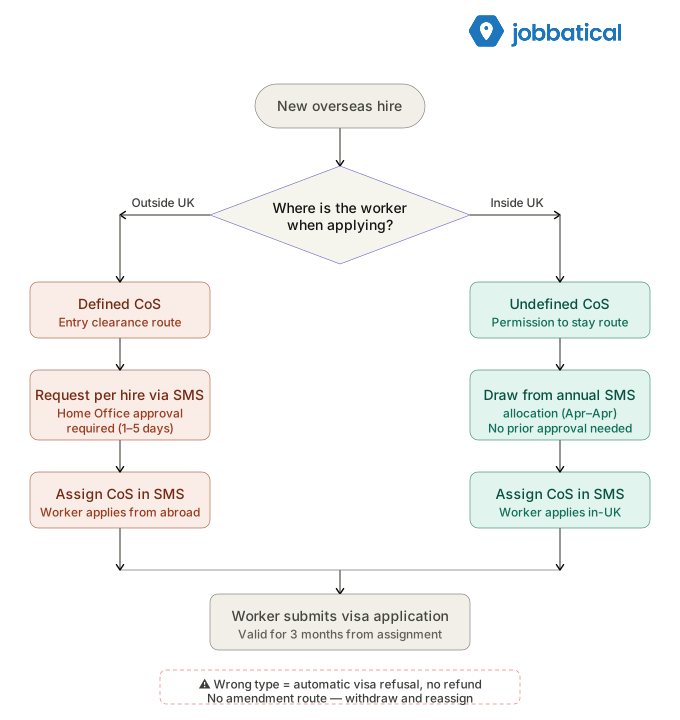
All temporary worker routes rely on undefined CoS. See how they work in our UK temporary worker visa routes guide.
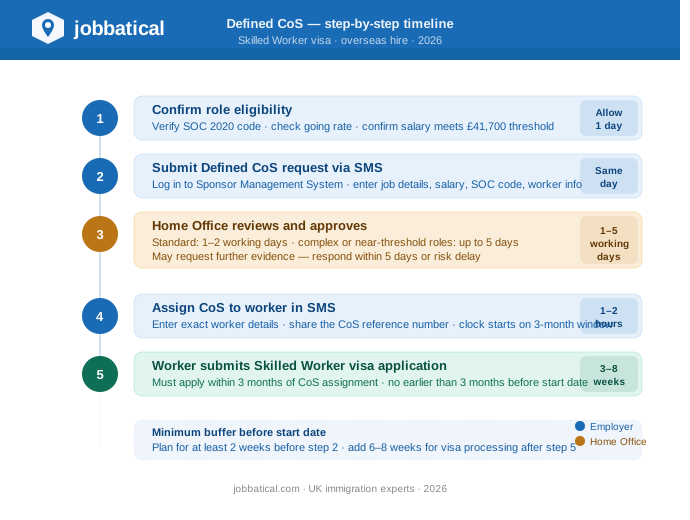
How to Apply for a Defined CoS (DCoS)?
Use this step-by-step workflow when sponsoring a Skilled Worker who is currently outside the UK.
Phase A: Requesting the Certificate
Before you can assign a Defined CoS to a worker, you must apply for permission to have that certificate added to your account.
Phase B: Assigning the Approved DCoS
Once approved by the Home Office, the certificate will show a status of Granted in your SMS repository.
- Locate the granted request in your SMS account and select Create and Assign.
- Input the worker's passport details matching their actual documentation identically.
- Pay the assignment fee (£525 standard) and the mandatory Immigration Skills Charge (ISC) if applicable (calculated based on company size and visa length).
- The system will generate a unique alpha-numeric reference number. Give this number to the worker immediately for their visa application.
Related Readings :
→If you are hiring someone who qualifies under this route (such as recent UK graduates or professionals under 26), under the specific salary thresholds and eligibility criteria through our full UK New Entrant CoS guide.
→ For exact defined and undefined processing times, and what converts a request, see our guide to UK Certificate of Sponsorship processing time.
How to Apply for an Undefined CoS (UCoS) Application?
Use this process when sponsoring someone inside the UK (visa extensions, switching from a student visa) or using non-Skilled Worker routes like Global Business Mobility.
Phase A: Securing Your Annual Quota
Unlike the DCoS, you cannot apply for an individual Undefined CoS as you go. You must have a pre-approved balance in your annual allocation pool.
- Initial Allocation: When you first apply for your UK Sponsor Licence, you estimate and justify how many Undefined certificates you will need for your first 12 months.
- Annual Renewal: Every year, 3 months before your allocation year ends (your "CoS Year"), you must request your next year's allocation via the SMS portal (Licence Summary -> Renew Annual Allocation), detailing upcoming extensions or planned in-country hires.
- In-Year Increases: If you run out of certificates mid-year, you must submit a Request an Increase to your Allocation form through the SMS.
To see how long an allocation increase takes and how the £350 priority route cuts it to about 5 working days, see our CoS Allocation Priority Service guide.
Phase B: Creating and Assigning the UCoS
If you have a remaining balance in your annual Undefined CoS allocation pool, the creation and assignment happen simultaneously.
For companies regularly hiring Graduate visa holders into permanent roles, your Undefined allocation can deplete faster than expected. Set a low-balance alert in your HR calendar for March each year, ahead of the April reset.
How to check your employee's location status
Before you even open the SMS, confirm where your worker will be when they submit the visa application. This is not the same as where they are today.
📌 Timing matters a lot. Most confusions arise with candidates who have recently left the UK or are planning to travel before their application.
If your employee travels out of the UK and applies from abroad, the Undefined CoS you already assigned will result in refusal.
Summary of Core Differences in Process Execution of Defined and Undefined CoS
Restricted vs unrestricted CoS and how they relate to defined/undefined
Restricted" and Unrestricted CoS aren't a separate system. They're the old names for defined and undefined.
- Restricted CoS → Defined CoS: The old restricted certificate is now the defined CoS, required for a migrant worker still living overseas when applying for a Skilled Worker visa, requested case-by-case through the SMS.
- Unrestricted CoS → Undefined CoS: The old unrestricted certificate is now the undefined CoS, used for a Skilled Worker applicant already in the UK, and required for all other sponsored visa categories.
- Why the change happened: Removing the cap on Skilled Worker visas effectively made the restricted certificate redundant, so the cap-driven restricted/unrestricted split was replaced by the current framework.
- Why it still matters for employers: Assigning an undefined CoS to a worker who requires a defined one is listed in the sponsor guidance as a ground for licence revocation so always confirm you're applying the current defined/undefined rules, whatever terminology older templates use.
What if you've already assigned the wrong CoS type?
There is no amendment route to change a CoS type. Here is what to do:
- Withdraw the CoS in the SMS immediately before your worker submits their visa application. Once they apply, it is too late.
- Request the correct CoS type, Ddefined (with Home Office approval) or Undefined (from allocation).
- Assign the new CoS and give your worker the new reference number.
- Recheck the 3-month validity window , the clock resets from the new assignment date.
📌 If the worker has already applied using the wrong type, there is nothing you can do to save that application.
- They will receive a refusal. Both fees are lost.
- Your employee will need to reapply using the correct CoS, and depending on their visa status and timeline, there may be implications for their right to work in the UK during that gap.
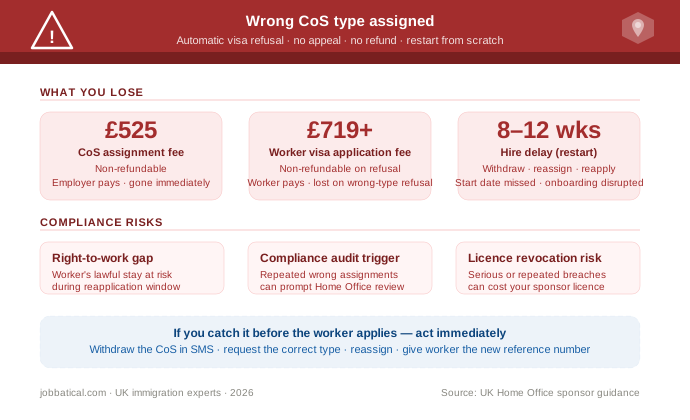
Common CoS Risks for Employers
- The Wrong CoS Type Selection:
- Accidentally assigning an Undefined CoS to an out-of-country applicant (or vice versa) leads to an automatic visa refusal. The Home Office offers no correction process for this error, meaning your CoS fees are forfeited and your timeline is reset.
- Misaligning SOC Codes and Salaries:
- Selecting an inaccurate Standard Occupational Classification (SOC) code or failing to meet the exact minimum salary thresholds (or specific going rates) will result in immediate rejection.
- Missing Critical Deadlines:
- An assigned CoS expires if the worker does not use it in a valid visa application within 3 months of issuance. Furthermore, a CoS cannot be assigned more than 3 months before the job’s official start date. Acquaint yourself with the CoS 3-month expiry window rule for processing.
- Inadequate Record-Keeping:
- Failing to capture and document proof of genuine vacancy or missing mandatory right-to-work checks leaves companies vulnerable during unexpected audits.
CoS Compliance Tips for Employers
If your company is hiring internationally at any scale, managing CoS type decisions manually is high risk. A single wrong assignment across a batch of hires can cascade into multiple refusals and audit exposure.
- For more on the full CoS process, see our UK Certificate of Sponsorship complete HR guide.
- For cost planning, see our UK CoS and sponsor licence fee breakdown.
- For the broader Skilled Worker visa picture, our UK Skilled Worker visa guide for HR teams covers eligibility, thresholds, and 2026 rule changes.
- For CoS best practisec check our CoS Allocation and Assignment guide.
Jobbatical's immigration platform gives your HR team a structured workflow for every hire , including automatic CoS type checks based on worker location, SMS integration, and compliance tracking for each active sponsorship. Our UK immigration experts handle Defined CoS requests, allocation monitoring, and correction procedures so your team is not making these calls alone.
Disclaimer: Immigration rules change quite frequently; please verify with official sources or contact us for the latest info before making any decisions.
Frequently Asked Questions: Defined vs Undefined Certificate of Sponsorship UK
What happens if I assign the wrong type of CoS?
The Home Office will automatically refuse the visa application. There is no way to correct a wrong-type CoS once the worker has submitted their application. You lose the £525 CoS fee, and your employee loses their visa fee. You must withdraw the CoS, request the correct type, and the worker must reapply from scratch.
How do I check whether my worker needs a Defined or Undefined CoS?
The rule is simple: where is the worker when they apply for the visa? If they are outside the UK at the time of application, you need a Defined CoS. If they are already in the UK on a valid visa and switching or extending, you need an Undefined CoS. Always verify through a right-to-work check and review of their current visa vignette or eVisa status.
Can I amend a CoS after it has been assigned?
Minor corrections to details such as salary or job title can be made in the SMS before the worker submits their visa application. However, you cannot change the CoS type. If you have assigned the wrong type, you must withdraw the CoS entirely, assign the correct type, and the worker must restart their visa application. Act quickly , a CoS is only valid for 3 months.
How does the SMS allocation work for Undefined CoS?
When your sponsor licence is approved, you are granted an annual allocation of Undefined CoS that runs April to April. You assign from this pool directly, with no individual Home Office approval needed. If you run low mid-year, you can request additional allocation through the SMS. Requests should include evidence of the role and worker details to avoid refusal.
Does a Defined CoS need Home Office approval every time?
Yes. Every Defined CoS requires a separate, individual request submitted through the SMS. The Home Office reviews each one against the SOC code, salary, and job description before approving. Standard processing is 1 to 2 working days, but complex cases or roles near the salary threshold can take up to 5 working days or longer.
What is the CoS fee in 2026?
The CoS assignment fee for the Worker route (including Skilled Worker) is £525 per certificate in 2026. This is in addition to the Immigration Skills Charge , £1,320 per year for medium and large sponsors, £480 per year for small sponsors , and the worker's own visa application fee. You cannot recover any of these costs from the employee.

.svg)
.svg)