.svg)



KEY TAKEAWAYS
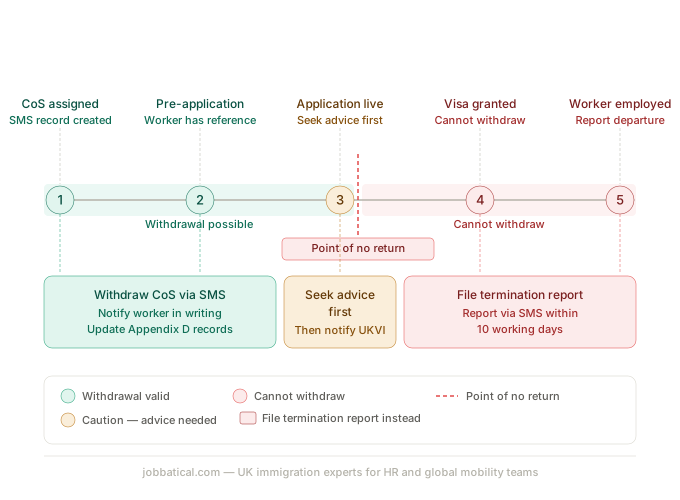
- Withdrawing a CoS is only possible before the worker's visa is granted, once they enter the UK on that CoS, you must follow termination and reporting procedures instead.
- Use the SMS 'Manage live CoS' option to initiate withdrawal; only Level 1 and Level 2 Users can action this.
- A withdrawn CoS does count against your annual allocation, the £525 fee is not refunded.
- If the worker has already submitted a visa application, UKVI must be notified and the application may be refused or withdrawn.
- Patterns of repeated CoS withdrawals can trigger a Home Office compliance review, always document your business reason.
What Does It Mean to Withdraw a CoS?
Withdrawing a CoS means cancelling it in the Sponsor Management System (SMS) before it results in a granted visa. There are two scenarios where this applies:
- CoS assigned, visa not yet applied for, the worker holds a CoS reference number but has not yet submitted their visa application to UKVI.
- CoS assigned, visa application already submitted, the worker has used the CoS reference in a live application. This is significantly more complex and requires UKVI notification.
Once CoS is withdrawn,
- The CoS reference number is cancelled and cannot be reused.
- The withdrawal counts against your annual allocation and the £525 fee is not refunded.
CoS withdrawal in the scenario where CoS is assigned and visa application already submitted, carries real risk to the worker's immigration status and should not be actioned without specialist advice.
Timeline showing CoS lifecycle and the point after which withdrawal is no longer possible
7 Valid Reasons to Withdraw a CoS
A Certificate of Sponsorship (CoS) can only be withdrawn before the worker submits their visa application. If any of the following scenarios occur, cancel the CoS in the SMS portal immediately.
- Rescinded Job Offer: The role is eliminated or the offer is canceled before the worker applies.
- Redundancy or Restructure: A company re-org eliminates the position. Ensure you document the business reason internally for your files.
- Candidate Backed Out: The worker declines the role or withdraws their acceptance after the CoS is generated.
- Unfixable CoS Errors: Major mistakes (such as an incorrect SOC code or salary tier) that cannot be fixed with a sponsor note. You must withdraw the CoS and issue a fresh one.
- Failed Background Checks: The candidate fails mandatory pre-employment vetting, references, or background checks. Keep these failed results in your Appendix D compliance files.
- Expiry Date Missed: The candidate fails to submit their visa application within the strict 3-month validity window after CoS assignment.
- Internal Hiring Freeze: A company-wide freeze makes the hire impossible. The Home Office expects to see a clear, documented business rationale for this during audits.
Critical Situations Where You Cannot Withdraw a CoS
When You CANNOT Withdraw a CoS
A CoS can only be canceled before a visa decision is made. You cannot withdraw a CoS if:
- The visa has already been granted.
- The worker has entered the UK.
- The employee has started working.
Any changes to their employment status must go through the SMS reporting route.
What The HR Must Do Instead
- Use SMS Reporting: If an employment relationship ends after visa approval, notify the Home Office via the "Report new activity" section in the SMS portal. This triggers the correct visa curtailment process.
- Respect the 10-Day Window: You must report a departure or contract termination within 10 working days of the employee's last day.
⚠️ The Compliance Risk: Attempting to "withdraw" a CoS for an active or departed employee leaves a major gap in your SMS records. Home Office inspectors actively look for these reporting mismatches during audits.
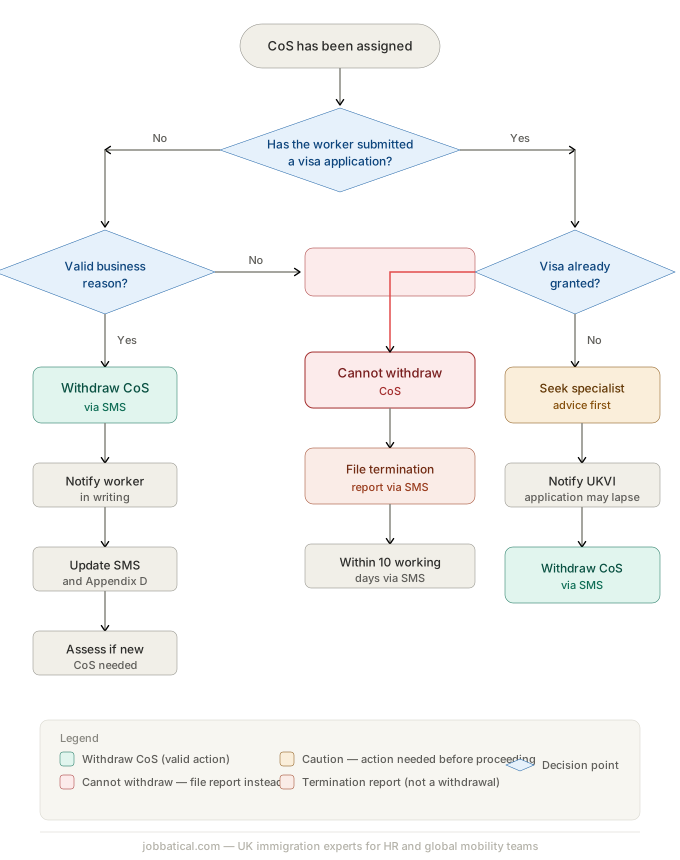
How to Withdraw a CoS: Step-by-Step
Step 1: Log into the SMS
Only Level 1 and Level 2 Users can action a CoS withdrawal. Level 1 Users have full licence-level access; Level 2 Users can manage CoS tasks but not licence settings. Log in at the Home Office SMS portal using your individual credentials, shared logins are a compliance violation.
Step 2: Check the CoS status before acting
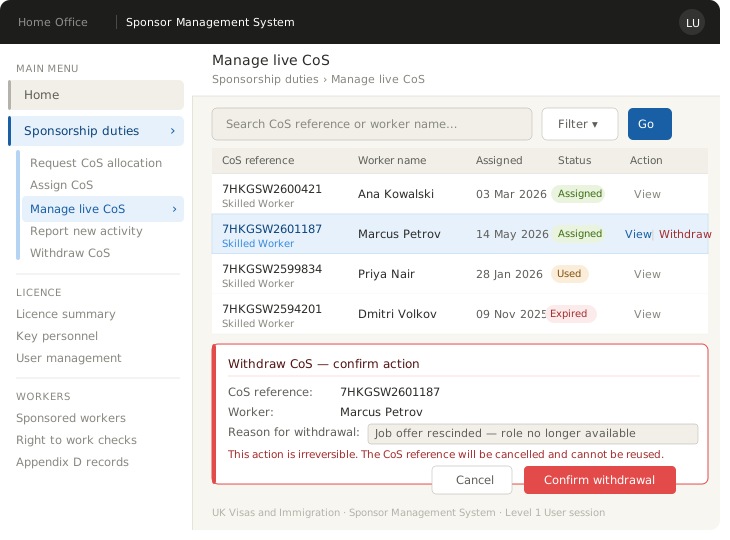
Locate the CoS under 'Manage live CoS' in the SMS dashboard. Check the status: assigned (not yet used in an application), used (submitted with a visa application), or expired. Acting without checking status first can create irreversible compliance issues, particularly if the application is already live with UKVI.
Step 3: Initiate the withdrawal
Under 'Sponsorship duties' → 'Manage live CoS', locate the relevant CoS record. Select 'Withdraw CoS' and confirm. The SMS will generate a confirmation. Save a screenshot or record the confirmation timestamp for your Appendix D file.
Step 4: Notify the worker
You have a legal and ethical obligation to inform the worker promptly. Communicate clearly: what has happened, why, and what it means for their visa process. If they have already submitted an application using this CoS, advise them to seek immigration advice immediately, they may need to withdraw or pause their application. Document your notification in writing and retain it in your Appendix D compliance records.
Step 5: Update your internal records
Remove the CoS from your active sponsorship tracking log, update your HR system, and retain all withdrawal documentation. The Home Office recommends keeping withdrawal records for at least one year after the event, longer if there is any associated compliance query.
Step 6: Assess whether a new CoS is needed
If the same role is being re-offered, whether to the same worker or a new candidate, a fresh Certificate of Sponsorship must be assigned. The withdrawn CoS cannot be reused. Budget for the £525 fee again; there is no waiver or credit for a previously withdrawn CoS.
Impact of CoS Withdrawal on the Worker
A CoS withdrawal affects a candidate differently depending on where they are in the visa process:
- Visa Not Yet Applied For: The CoS reference number becomes instantly invalid. The candidate cannot proceed until you issue a new one.
- Visa Application In Progress: UKVI must be notified. The application will be refused unless the candidate formally withdraws it first.
- Worker Already in the UK: Proceed with extreme caution. If the worker is relying on Section 3C leave (staying legally while awaiting a visa decision), withdrawing the CoS can immediately end their lawful stay in the UK. Seek legal advice before acting.
HR Best Practice: Communicate changes immediately. Candidates take major financial and personal risks to move to the UK. Being transparent and documenting everything protects your reputation as an international employer.
Impact on Your Sponsor Licence
- A single withdrawal with a documented business reason is unlikely to trigger a compliance review.
- Repeated withdrawals, especially without clear documentation, can raise red flags during a Home Office audit. UKVI looks for patterns that suggest speculative CoS assignment.
- Always document the reason for every withdrawal in your Appendix D records. "Role made redundant" or "worker withdrew acceptance" is defensible. An undocumented withdrawal is not.
- If the withdrawal involves a worker who has already submitted a visa application, the compliance stakes are higher, seek advice from a CoS management specialist before proceeding.
For a full picture of your ongoing compliance obligations, run Jobbatical's UK Sponsor Licence Compliance Assessment to surface any gaps before they become an issue.
Best Practices to Avoid Unnecessary CoS Withdrawals
- Double-Check Core Details: Verify the SOC code, salary threshold, and job description against UKVI rules before hitting submit. Review against the CoS Document checklist.
- Match Passports Exactly: Cross-check the candidate’s name, date of birth, and nationality. Typos in these fields often cannot be fixed with a sponsor note and require a full restart.
- Get Written Acceptance: Never assign a Defined CoS based on a verbal agreement. Secure written confirmation from the candidate first to ensure they are committed.
- Create Internal Sign-Offs: Require dual approval from HR and the hiring manager before generating a CoS to catch last-minute role or salary changes.
- Track Expiry Dates: Set automated alerts for the 3-month Defined CoS validity window. Letting a CoS lapse means paying new fees and delaying your hire.
- Consult Experts for Complex Cases: Seek specialist advice immediately if a candidate has already submitted their visa, or if the cancellation involves redundancy, misconduct, or failed background checks.
Leverage Global Mobility Tech: Avoid manual mistakes entirely by using a managed service like Jobbatical. We run pre-submission compliance checks on every CoS to catch errors before they reach the SMS portal. Book a demo to see how it works.
Summary
- CoS withdrawal is easy when the worker has not yet applied for a visa; but gets complicated, and consequential, once a visa application is live.
- It is important to understand the difference between withdrawal and termination reporting as it has compliance breach and serious disruption risk to your worker's immigration status.
- If you are unsure whether withdrawal is the right step, or if you are dealing with a live visa application, talk to Jobbatical's UK immigration team before actioning anything in the SMS.
Disclaimer: Immigration rules change quite frequently; please verify with official sources or contact us for the latest info before making any decisions.
Frequently Asked Questions, Withdrawing a Certificate of Sponsorship UK
Can you withdraw a CoS after the worker has entered the UK?
No. Once a worker has entered the UK on the basis of a CoS, withdrawal is no longer an option. If the employment relationship ends, you must report this to the Home Office via the Sponsor Management System (SMS) within 10 working days. Confusing withdrawal with termination reporting is one of the most common, and costly, compliance mistakes UK sponsors make.
Does withdrawing a CoS affect your sponsor licence?
A single withdrawal with a clear business reason is unlikely to trigger action. However, repeated withdrawals, especially without documented justification, can raise red flags during a Home Office compliance visit. Always retain a written record of the reason for every CoS withdrawal in your Appendix D files.
Is the £525 CoS fee refunded if you withdraw?
No. The £525 CoS fee is non-refundable regardless of the reason for withdrawal. If you need to assign a new CoS for the same role, whether for the same worker or a different candidate, you will need to pay the fee again. This is one reason why pre-CoS checks before assignment matter so much.
What happens to the worker's visa application if you withdraw a CoS they have already used?
If the worker has already submitted their visa application using the CoS reference number, UKVI must be notified of the withdrawal. The application is likely to be refused or withdrawn. The worker will need a new CoS and a fresh application to proceed. Seek specialist immigration advice before taking this step, the worker's immigration status may be affected depending on their current leave.
Does a withdrawn CoS count against your annual CoS allocation?
Yes. A withdrawn CoS is counted against your annual allocation and cannot be reused or reassigned. If you need to sponsor the same role again, you must request a new CoS from your existing allocation, or apply for an allocation increase if you have insufficient numbers remaining.
Who can withdraw a CoS in the Sponsor Management System?
Only Level 1 and Level 2 Users on your Sponsor Management System account can action a CoS withdrawal. Level 1 Users have full access to all sponsorship functions. Level 2 Users can manage CoS tasks but cannot make changes to the licence itself. The Authorising Officer has Level 1 access by default.

.svg)
.svg)