

KEY TAKEAWAYS
- Your sponsor licence requires at least one Level 1 User at all times , if that person leaves without a replacement, your licence could be revoked.
- Level 1 Users have full SMS access; Level 2 Users can only assign CoS and report on workers they have personally sponsored.
- Most HR errors on the SMS , wrong occupation codes, missed reporting deadlines, unupdated contact records , come from confusion about which user type should be doing what.
- You can appoint an external HR provider or Jobbatical as a Level 1 User, which is the fastest way to remove compliance risk without building in-house expertise.
- A Home Office compliance visit can happen with no warning , your SMS must be accurate, current, and correctly structured before that day arrives.
Most HR Teams Don't Know Who Their Level 1 User Is
It sounds like a small admin detail. In reality, it's one of the most common reasons UK employers have their sponsor licence suspended or revoked. If your Level 1 User leaves the company tomorrow and no one has a replacement ready, your organisation is in breach of its licence conditions , regardless of how well everything else is running.
This guide breaks down what a Level 1 User actually does, how it differs from a Level 2 User, and where most HR teams go wrong managing the Sponsor Management System (SMS).
What Is a UK Sponsor Licence Level 1 User?
A UK sponsor licence requires your organisation to appoint key personnel to manage sponsorship obligations. The Level 1 User is the person (or people) who handle the day-to-day running of your sponsor licence through the Home Office's online portal , the Sponsor Management System (SMS).
Level 1 Users have full access to the SMS. Their responsibilities include:
- Assigning Certificates of Sponsorship (CoS) to sponsored workers
- Reporting changes in worker circumstances to UKVI , absences, role changes, salary changes , within 10 working days
- Adding and removing other SMS users
- Updating your organisation's contact details and licence information
- Applying to renew the sponsor licence and tracking application progress
- Monitoring the SMS message board for Home Office communications
The Home Office also requires Level 1 Users to access their SMS account regularly , at least monthly. Patterns of delayed updates or missed reports are among the most common triggers for a compliance downgrade.
At the point of application, you can only nominate one Level 1 User. That person must be an employee, director, or partner of your organisation. After your licence is granted, you can add more via the SMS.
Level 1 vs Level 2 User: What's Actually Different
The key difference is scope of access. A Level 2 User has a limited, delegated role , useful in larger teams where multiple staff need to assign sponsorships, but without needing full control of the licence.
Level 1 vs Level 2 User: Access Comparison
| SMS Function | Level 1 User | Level 2 User |
|---|---|---|
| Assign Certificates of Sponsorship | Yes | Yes (Only those CoS that are personally created by them) |
| Report worker changes to UKVI | Yes (all sponsored workers) | Yes (only their own CoS) |
| Update organisation/licence details | Yes | No |
| Add or remove SMS users | Yes | No |
| Apply to renew sponsor licence | Yes | No |
| View full licence details and message board | Yes | No |
| Can be an agency temp worker | No | Yes |
| Required at application stage | Yes (one mandatory) | No (optional; added post-grant) |
Need this information for later? Download now.
Level 2 Users can only be added after your licence has been granted. There is no requirement to have any, but for mid-to-large organisations, they're a practical way to distribute CoS assignment duties without handing over full licence access.
One important point: the Home Office holds your Authorising Officer accountable for the actions of every SMS user. The more users you add, the harder it becomes to maintain proper oversight. Keep numbers low and access deliberate.

The HR Risks Most Companies Don't See Coming
In practice, sponsor licence compliance problems tend to cluster around a few predictable failure points. These aren't obscure edge cases , they're the same issues appearing in Home Office enforcement action again and again.
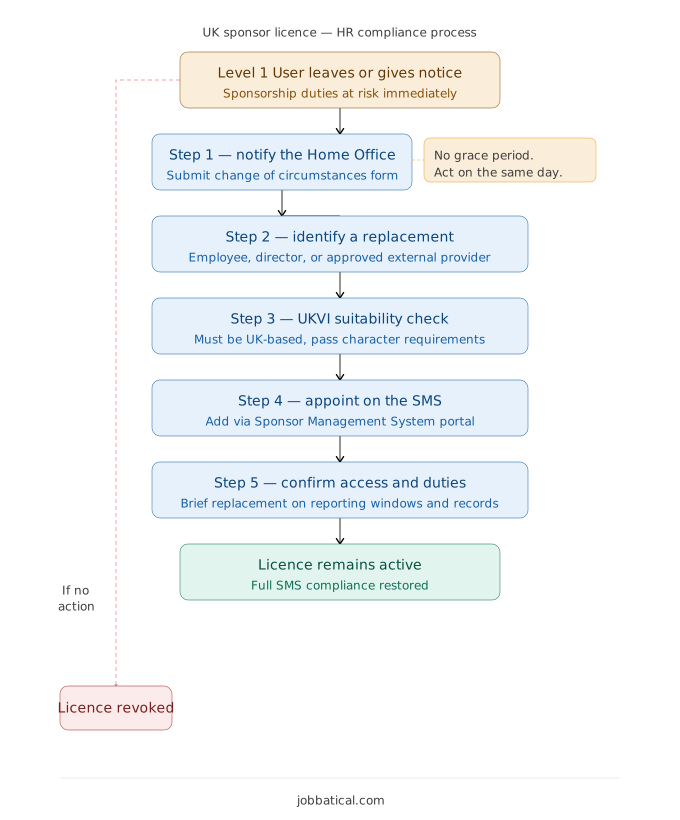
- Staff turnover with no succession plan: If your only Level 1 User resigns and you don't notify the Home Office and appoint a replacement promptly, you're in breach. The Home Office can revoke licences where no active Level 1 User is in place. Read What Happens If Your Sponsor Licence Is Revoked?
- Wrong occupation codes on CoS: A mismatched SOC code or inaccurate job description on a Certificate of Sponsorship can cause visa refusals and trigger compliance action. Level 2 Users assigning CoS without adequate guidance are a common source of this error.
- Missed 10-working-day reporting windows: Role changes, salary adjustments, absences over four weeks, and workers leaving must all be reported within 10 working days. There is no grace period. Missed deadlines are the single most common cause of licence downgrades.
- Outdated user records: Level 1 Users who have left your organisation but remain active on the SMS create both a security risk and a compliance gap. UKVI expects user records to be current at all times.
- Confusion about who owns which task: In teams with both Level 1 and Level 2 Users, it's common for critical reporting duties to fall through the cracks when roles aren't clearly defined.
Honestly, most companies wait too long to address these gaps , often until a Home Office letter arrives. By then, the cost of remediation is significantly higher than it would have been with proactive management.
See here how Employee exit should be intimated to Home office to keep License compliant.
How Jobbatical Manages Your Sponsor Licence Compliance
If your HR team is managing sponsored workers alongside everything else they handle, SMS compliance is almost always under-resourced. Jobbatical's UK sponsor management system service removes that burden without requiring you to build specialist immigration expertise in-house.
Here is what working with Jobbatical actually looks like for your team:
- SMS management as a named Level 1 User: Jobbatical can be appointed as an additional Level 1 User on your licence, managing day-to-day portal activities on your behalf while your organisation retains the required internal user.
- CoS assignment with compliance checks built in: Before any Certificate of Sponsorship is assigned, our team verifies SOC codes, salary thresholds, and worker eligibility , reducing the risk of errors that cause visa refusals.
- Proactive reporting within statutory deadlines: We track worker records and flag required reports before the 10-working-day window closes, so your team never misses a deadline.
- Right-to-work verification support: With BRPs being phased out entirely by 31 December 2026 , your sponsored workers will need to use eVisa share codes for right-to-work checks. Jobbatical helps your team transition smoothly.
- Audit readiness at all times: Home Office compliance visits can happen with no notice. We keep your SMS data current, your records organised, and your team briefed so there are no surprises.
Other areas Jobbatical can support your team:
- Beyond the SMS, Jobbatical supports the :
- full sponsorship lifecycle , from your initial sponsor licence application,
- through Certificate of Sponsorship issuance,
- Skilled Worker visa applications,
- and visa renewals for your employees.
- Also, the dependent visa support as an extension of sponsored worker lifecycle.
- If you want to check your current compliance position before engaging a service, use Jobbatical's free sponsor licence compliance assessment , it takes a few minutes and surfaces the gaps that matter most before a Home Office visit does.
Disclaimer: Immigration rules change quite frequently; please verify with official sources or contact us for the latest info before making any decisions.
Frequently Asked Questions: UK Sponsor Licence Level 1 and Level 2 Users
What is a Level 1 User on a UK sponsor licence?
A Level 1 User has full operational access to the Home Office's Sponsor Management System (SMS). They assign Certificates of Sponsorship, report worker changes to UKVI, update licence details, add or remove other users, and apply to renew the licence. Every organisation must have at least one Level 1 User who is an employee, director, or partner at all times.
What is the difference between a Level 1 and Level 2 User?
Level 1 Users have full SMS access including organisational-level tasks, user management, and licence renewal. Level 2 Users have restricted access; they can only assign CoS and report activity on sponsorships they have personally created. Level 2 Users cannot update core licence details, add new users, or access organisation-wide reports.
Does a Level 1 User have to be a company employee?
At least one Level 1 User must always be an employee, director, or partner of the licence-holding organisation. After licence grant, additional Level 1 Users can be employees of a third-party HR provider, such as Jobbatical, provided they are UK-based and pass UKVI suitability checks. However, the Home Office will not accept a structure where full SMS control sits entirely outside your business.
What happens if your Level 1 User leaves the company?
If your only Level 1 User leaves and no replacement is in place, you must notify the Home Office immediately using a sponsor change of circumstances form. Operating with no active Level 1 User is a direct compliance breach and can lead to licence revocation. This is one of the most common , and avoidable , reasons HR teams lose their sponsor licence.
Can an external immigration provider like Jobbatical act as a Level 1 User?
Yes. After your licence is granted, you can appoint a UK-based employee of an external HR or immigration provider as an additional Level 1 User, provided they meet UKVI suitability requirements. Jobbatical's team can be added in this capacity, managing day-to-day SMS duties on your behalf while your organisation retains at least one internal Level 1 User as required by the Home Office.
How many Level 1 and Level 2 Users should your company have?
The Home Office recommends keeping numbers low to maintain oversight. Practically, most mid-to-large organisations benefit from two to three Level 1 Users to ensure cover if someone is absent or leaves. Level 2 Users are useful in large teams where multiple HR staff need to assign CoS but do not require full licence access. The Authorising Officer decides the structure and is accountable for all user activity.

.svg)
.svg)