

KEY TAKEAWAYS: UK Right to Work Share Code Checks
- Run the online check at gov.uk/view-right-to-work using the worker's share code and date of birth before their first day; a skipped check risks a civil penalty of up to £60,000 per worker.
- A right to work share code begins with "W", is valid for 90 days, and can be reused in that window; reject rent or benefits codes.
- The check is only valid if you match the photo to the person live and save the dated profile page as evidence.
- For time-limited status, diarise a follow-up check before the expiry date, or your statutory excuse lapses.
- If status will not show online, request a Positive Verification Notice via the Employer Checking Service for a six-month statutory excuse.
A share code check that is skipped, screenshotted, or done wrong carries a civil penalty of up to £60,000 per worker. That number is why this sits with you, not the applicant. Here is how to run a compliant online right to work check with a share code, and what to do when it goes sideways.
What Is a Right to Work Share Code?
A right to work share code is a nine-character alphanumeric code that lets you confirm a non-UK national's immigration status against live Home Office records. The worker generates it; you verify it.
How a Share Code Proves Right to Work Online
Instead of copying a passport or an old biometric residence permit, you view the worker's current status online. The record is pulled in real time, so it reflects any recent change to their permission.
- Replaces physical document checks for anyone with digital status.
- Shows the work types permitted and any time limit.
- Gives you a statutory excuse only when you complete and save the check yourself.
Who Can and Cannot Use a Share Code
- Can use it: eVisa holders, EU Settlement Scheme status holders, BRP or BRC holders, and most visa holders with digital status.
- Cannot use it: British and Irish citizens. Their passport proves status, so they sit under a separate check, either a manual document check or a certified identity service provider.
How Employees Generate a Share Code
You cannot create the code for them. The worker produces it, then passes you the code plus their date of birth.
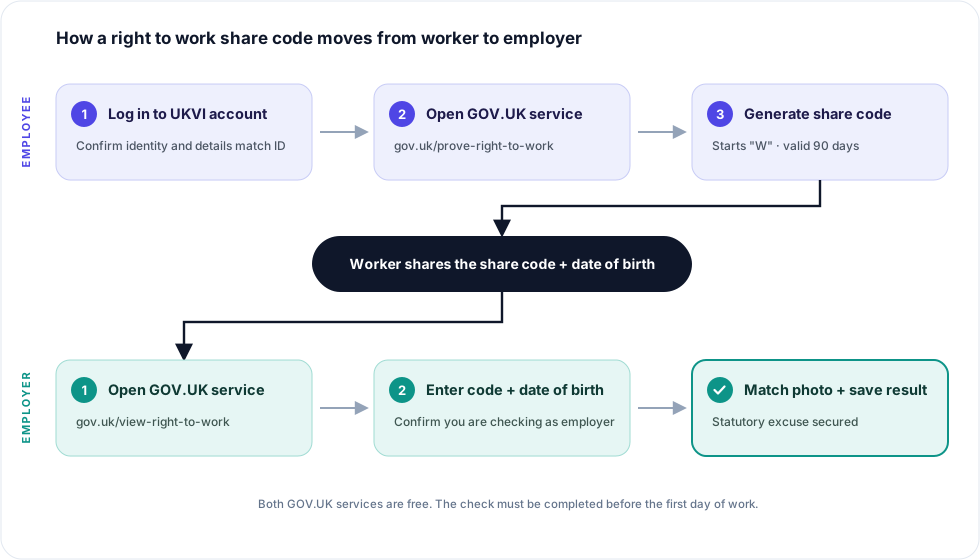
How a right to work share code moves from worker to employer
Using the GOV.UK "Prove Your Right to Work" Service
The worker goes to the free service at gov.uk/prove-right-to-work and selects "prove your right to work to an employer".
What the Employee Needs: UKVI Account and ID Details
- A UKVI account linked to their eVisa.
- The ID used to create that account (passport, BRP, or national ID).
- Access to the phone or email on the account for the security code.
If they have not set up their eVisa yet, point them to our UK eVisa and UKVI account guide. (Most hold-ups here come from an unmigrated account, not a system fault.)
Share Code Rules: 90-Day Validity and the "W" Prefix
- Valid for 90 days from the day it is generated, and reusable in that window.
- A right to work code starts with "W", for example W12 345 67G.
- A code for rent or benefits will not open the right to work record. Reject it and ask for a work code.
Right to Work vs Right to Rent vs Other Status Codes
Which Share Code Counts for a Right to Work Check
Step-by-Step: How Employers Check a Share Code
The check takes a couple of minutes. Do it before the first day of work, every time.
- Get the share code and date of birth. You need both; the code alone will not open the record.
- Open the "View a job applicant's right to work" service at gov.uk/view-right-to-work.
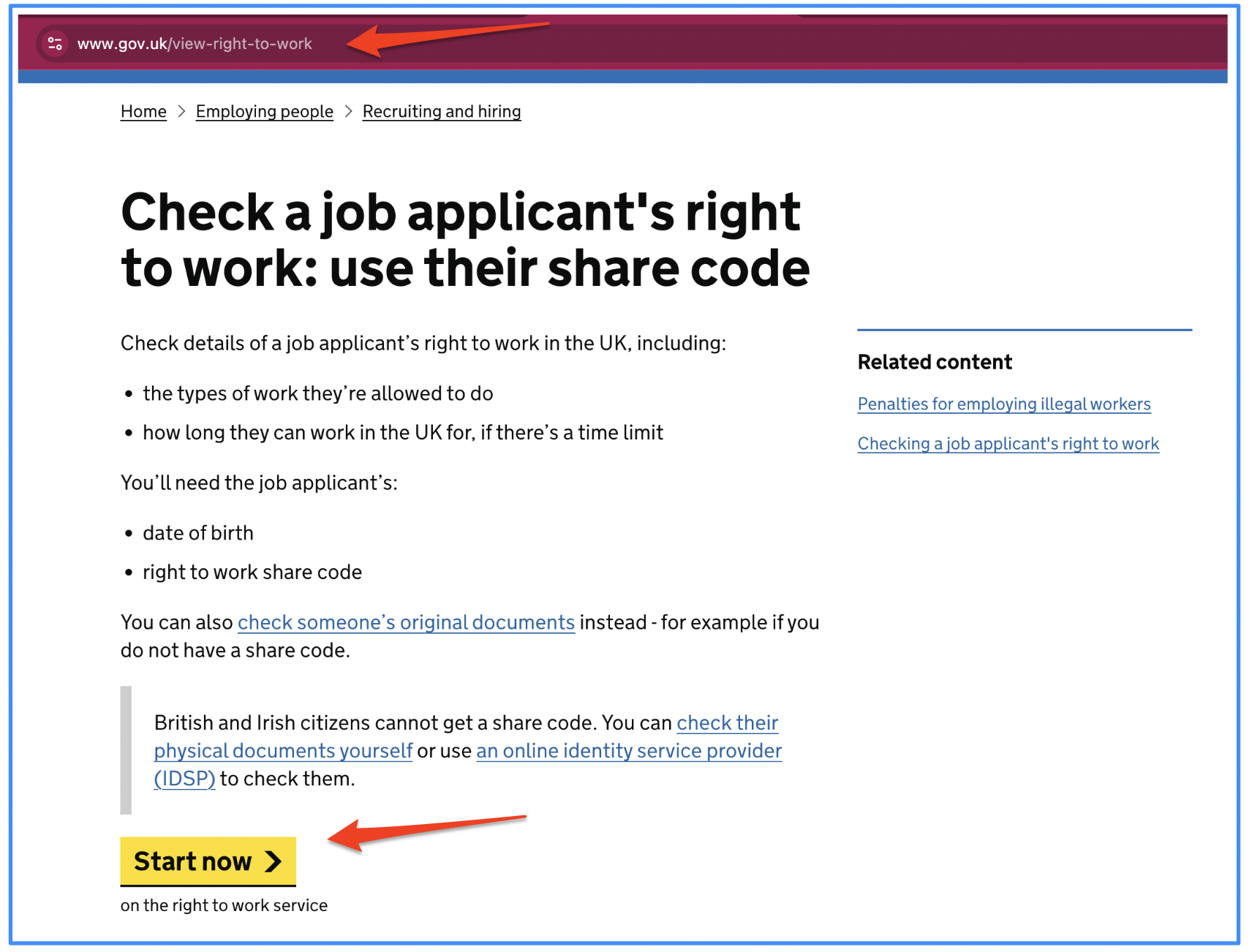
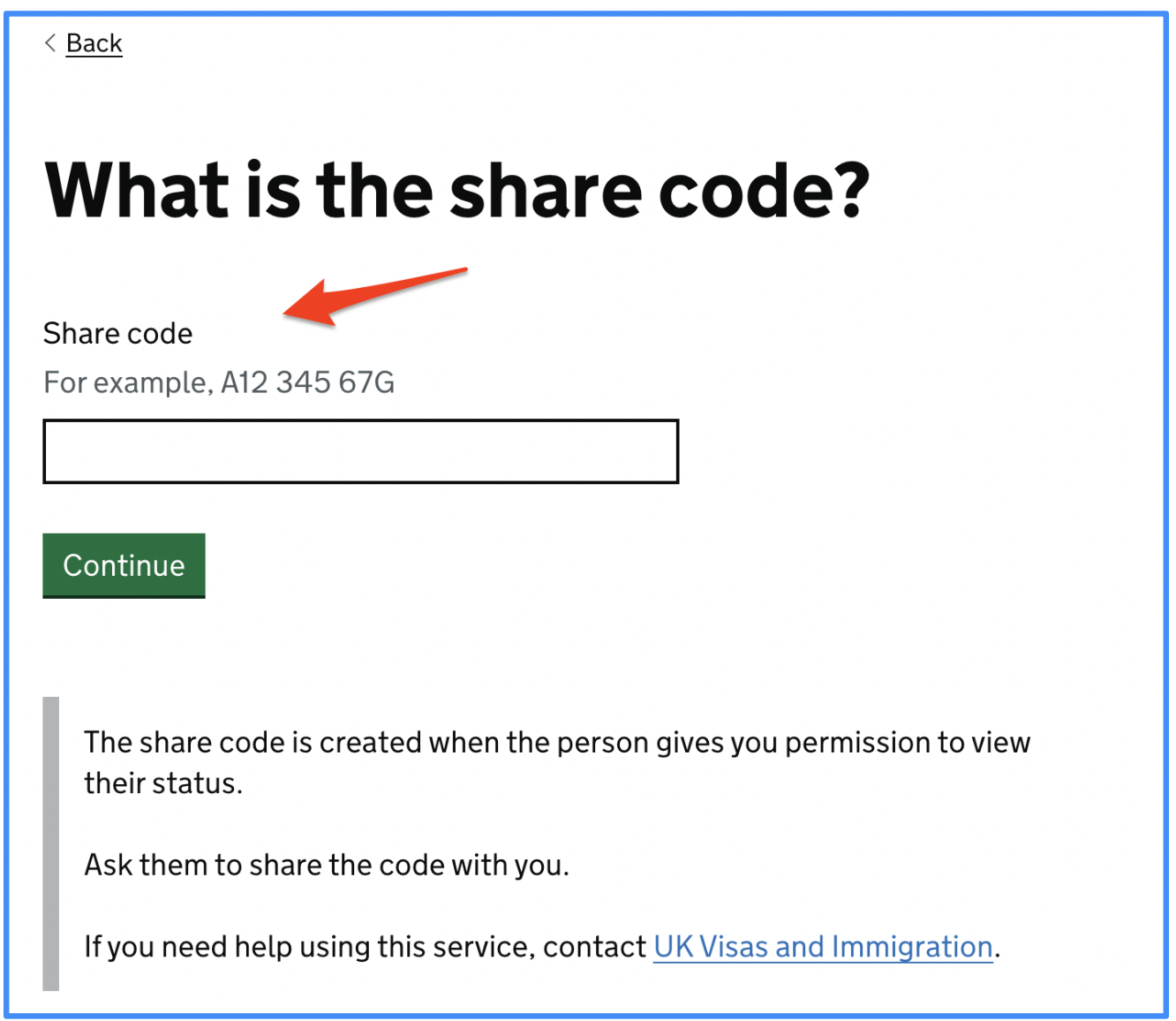
3. Enter the share code and date of birth, then confirm you are checking as an employer.
4. Match the photo to the person, in person or over a live video call. The face on the screen must be the person doing the job.
5. Save the profile page as evidence, dated, as a PDF or printout. This is what gives you the statutory excuse. Our record-keeping guide covers how long to hold it.
How to Read the Result
A green result is not automatically a yes for your role. Read what it actually permits.
Permission Type and Expiry Date
- Shows whether the status is settled (no time limit) or time-limited.
- A time-limited status carries a date; log it as a follow-up check.
Work Restrictions: Hours Limits and Prohibited Roles
- Student status often caps term-time work at 20 hours per week.
- Some statuses bar specific work; the record spells it out.
What a "No Right to Work" or Unclear Result Means
If the service cannot confirm status, you do not have a statutory excuse. Do not let the person start. Move to the Employer Checking Service, covered below.
What the Result Tells You and Your Next Step
Troubleshooting Share Code Problems
Code Won't Generate or Shows an Error
Usually a UKVI account issue. Ask the worker to confirm the account is set up and their details match their ID exactly.
Details Don't Match Your HR Records
A mismatched name or date of birth is a red flag, not a typo to wave through. Read our guide on what to do when your records and the share code disagree before you proceed.
Expired Code or Wrong Code Type
- Past 90 days: ask for a fresh code.
- Wrong prefix: it is a rent or benefits code; request a work code.
Online Service Unavailable or Status Not Showing
If status cannot be shown online, use the Employer Checking Service to request a Positive Verification Notice. It gives a six-month statutory excuse while the Home Office confirms status. For the wider digital shift, see our UK right to work compliance guide.
Share Code Mistakes Employers Make
- Accepting a screenshot. A screenshot proves nothing. You must run the check yourself, live.
- Skipping the photo match. No face check means no valid check, even with a green result.
- Not noting the follow-up date. Miss the re-check on a time-limited status and your statutory excuse lapses.
In practice, the follow-up date is where most teams slip. If you are running checks across dozens of hires and renewal dates, manual tracking breaks down fast. Book a demo to see how Jobbatical tracks share codes, expiry dates, and follow-up checks in one place.
Before your next international hire starts, decide one thing: who owns the share code check, and where the saved evidence lives. Get that right once and the £60,000 risk stops being yours to carry. For the bigger picture on your duties as a licensed employer, review our UK sponsor licence compliance guide.
Disclaimer: Immigration rules change quite frequently; please verify with official sources or contact us for the latest info before making any decisions.
Frequently Asked Questions — UK Right to Work Share Code Checks