.svg)


_11zon.webp)
POINTS CLÉS
- La vérification du droit au travail d'un titulaire d'un permis ILR vous confère une exemption légale permanente ; aucune vérification complémentaire n'est requise pendant toute la durée de l'emploi.
- À compter du 31 décembre 2026, les BRP physiques ne seront plus valables ; les titulaires d'un permis de séjour illimité (ILR) devront justifier de leur statut à l'aide d'un nouveau code de partage d'eVisa généré depuis leur compte UKVI.
- Dès que le statut ILR est accordé, ce salarié ne compte plus dans le quota de votre licence de parrainage ; retirez-le du suivi SMS et cessez de signaler ses changements.
- Vérifiez à nouveau le droit au travail pour le nouveau visa électronique ILR, puis archivez l'ancien dossier du salarié parrainé en y ajoutant une mention claire indiquant qu'il s'agit d'un dossier post-ILR, ainsi que la date.
- Conserver les anciens dossiers relatifs aux travailleurs qualifiés pendant la durée du parrainage plus un an, et les nouveaux dossiers de vérification de l'emploi figurant sur la liste A pendant deux ans.
Oui. Et quelques autres choses aussi.
Dès l'octroi de l'ILR, le statut d'immigration du salarié passe de « parrainé » à « établi ». Votre ancien dossier « droit au travail » est lié à un visa qui n'existe plus. Vos obligations de parrainage envers cette personne prennent ainsi fin. La paie, les avantages sociaux, le système d'information des ressources humaines (SIRH) et les déclarations au Home Office doivent tous être mis à jour, et la plupart des équipes RH omettent au moins l'un de ces éléments lors de la transition.
Voici précisément les éléments à mettre à jour, dans quel ordre, lorsque votre salarié quitte l'entreprise.
Quels changements interviennent le jour où l'ILR est accordé ?
Le titre de séjour à durée indéterminée correspond à une installation définitive. Il supprime les limites de durée, met fin aux conditions liées au visa et rend inutile le parrainage continu. Pour les RH, cela entraîne quatre changements le jour même.
- Dossier « droit au travail » : l'ancien contrôle est lié à une procédure de visa périmée. Refaites-le dans la liste A.
- Licence de parrainage : cet employé n'est plus pris en compte dans votre effectif parrainé. Cessez de générer des rapports SMS le concernant.
- Exemption légale : passage d'une durée limitée à une durée illimitée ; plus de rappels calendaires pour les contrôles de suivi.
- Documentation : Le BRP physique n'existe plus. L'employé dispose d'un eVisa lié à son compte UKVI.
Veillez à accomplir ces quatre démarches dans les deux semaines suivant l’octroi de la subvention ILR. Si une inspection de conformité a lieu et que vous continuez à suivre un salarié déjà en situation régulière comme s’il était toujours sous votre parrainage, cela soulève des doutes quant à l’exactitude de vos autres documents.
Réexamen de la loi sur le droit au travail : quelles sont les exigences concrètes ?
Un titulaire d'un permis ILR relève de la liste A : droit permanent de travailler au Royaume-Uni. Une vérification conforme à la liste A vous confère une excuse légale continue pour toute la durée de l'emploi. Aucune autre vérification n'est nécessaire par la suite.
La version pratique
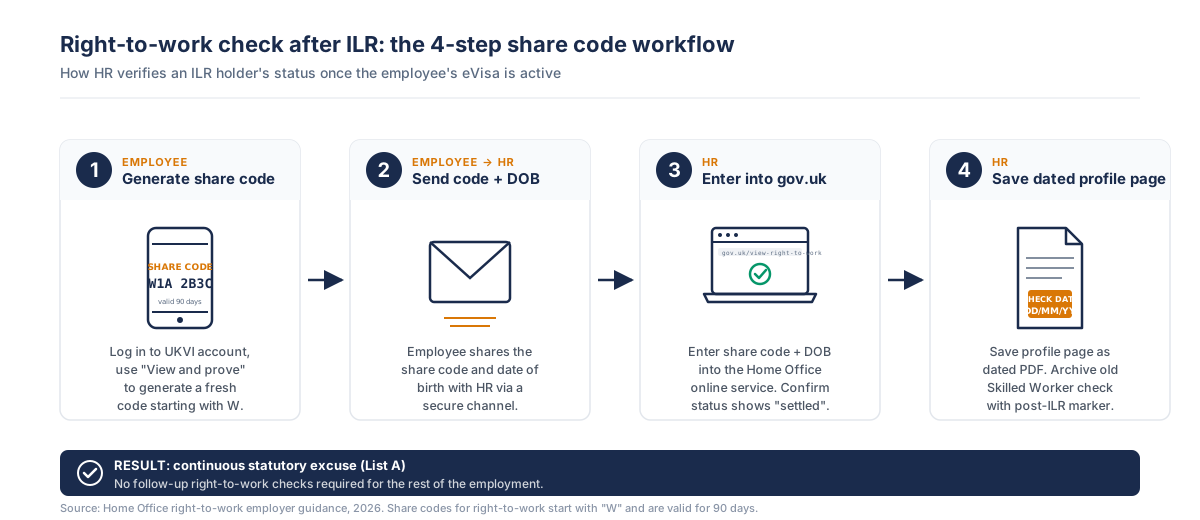
- Demandez à l'employé de générer un nouveau code de partage pour son eVisa à partir de son compte UKVI, en utilisant le service du Home Office intitulé « Consulter et justifier votre statut d'immigration ».
- Saisissez le code d'identification ainsi que leur date de naissance sur le service en ligne de vérification du droit au travail du Home Office.
- Vérifiez que la page de profil indique le statut « régularisé » ou « permis de séjour à durée indéterminée », sans date d'expiration ni restriction en matière de travail.
- Enregistrez la page de profil au format PDF en y indiquant la date. Notez la date de vérification directement sur le fichier. Une entrée dans un tableur sans date ne sera pas prise en compte lors d'un audit.
- Archivez l'ancienne attestation de droit au travail pour les travailleurs qualifiés en y ajoutant la note suivante : « Remplacée par l'attestation de la liste A en date du [date] à la suite de l'octroi de l'ILR. »
N'acceptez pas uniquement l'ancien BRP, l'ancien code d'action ou la lettre d'octroi de l'ILR. La vérification du nouveau code d'action constitue la preuve que le Home Office attend. Pour en savoir plus sur les règles de la liste A et le fonctionnement des exceptions légales, consultez notre guide sur la conformité au droit au travail au Royaume-Uni.
Statut « droit au travail » : avant et après l'ILR
| Article | Travailleur qualifié (avant l'ILR) | Après l'ILR |
|---|---|---|
| Motif légal d'absence | À durée limitée | En continu |
| Vérification de suivi concernant le « droit au travail » | À effectuer avant l'expiration du visa du salarié. | Non requis. |
| Type de preuve | Code de partage eVisa confirmant l'autorisation d'immigration à durée déterminée de l'employé. | Code de partage eVisa confirmant l'autorisation de séjour illimité (ILR). |
| Conservation des documents | Durée d'emploi plus 2 ans. | Durée d'emploi plus 2 ans. |
| Rapports du système de gestion des sponsors (SMS) | Obligatoire pour les changements devant faire l'objet d'une déclaration, notamment le poste, le salaire et le lieu de travail. | Il n'y a plus d'obligations de déclaration pour le sponsor une fois que le parrainage prend fin à la suite d'un ILR. |
| Immigration Skills Charge (ISC) | À régler lors de l'attribution d'un nouveau certificat de parrainage dans le cadre d'un renouvellement ou d'une prolongation de visa, le cas échéant. | Cette indemnité n'est plus due dès lors que le salarié a obtenu le statut de résident permanent (ILR). |
Les visas électroniques et le code de partage : une réalité exclusivement numérique
À compter du 31 décembre 2026, les BRP papier ne seront plus valables pour les contrôles du droit au travail. Cette mesure s'applique aussi bien aux travailleurs parrainés qu'aux titulaires d'un permis de séjour illimité (ILR). En ce qui concerne plus particulièrement les salariés titulaires d'un ILR :
- Le visa électronique ILR est associé au même compte UKVI que celui utilisé dans le cadre du programme « Skilled Worker ».
- Un nouveau code d'action doit être généré après l'octroi de l'ILR ; les anciens codes d'action liés au visa précédent ne sont plus valides.
- Les codes de partage destinés au « droit au travail » commencent par « W » ; les codes commençant par « R » ou « S » ne fonctionneront pas.
- Le code de partage est valable pendant 90 jours ; le chèque doit être rempli dans ce délai.
Dans la pratique, certains titulaires d’un permis de séjour illimité (ILR) ne créent jamais leur compte UKVI, car leur carte de résident (BRP) a toujours fonctionné aux frontières et pour les opérations bancaires. Réglez cette question dès le premier jour, sinon la vérification secondaire risque de prendre du retard. Notre comparatif entre l’ILR et le « statut de résident permanent » (Settled Status) présente plus en détail les différences entre ces deux statuts numériques si votre équipe compte des membres relevant de ces deux catégories.
Licence de sponsor : ce qui prend fin, ce qui se poursuit
Une fois le statut ILR accordé, le parrainage de cet employé prend fin. Concrètement :
- Plus aucune notification par SMS concernant leur poste, leur salaire ou tout changement de lieu de travail.
- Aucune redevance sur les compétences en matière d'immigration ne s'appliquera aux futures prolongations ; il n'y a rien à prolonger.
- Le dossier CoS n'est plus actif, mais il convient de le conserver pendant toute la durée du parrainage, plus un an, conformément à l'annexe D.
- Ne tenez pas compte de cet employé dans l'effectif des travailleurs parrainés lors des contrôles de conformité.
- Le suivi des absences au regard de la règle d'éligibilité à l'ILR (180 jours) prend fin ; toutefois, l'ILR elle-même expire après deux ans passés à l'étranger, de sorte qu'une autre règle relative aux absences s'applique désormais.
Votre licence reste inchangée pour tous les autres. Si vous aviez dix salariés parrainés et que l'un d'entre eux s'installe définitivement, vous en avez désormais neuf. Mettez à jour le tableau de suivi de vos utilisateurs de niveau 1 pour refléter cette situation ; consultez notre guide des bonnes pratiques SMS pour savoir comment maintenir à jour la liste des salariés parrainés.
La liste de contrôle des mises à jour RH : au-delà du « droit au travail »
La réévaluation de la loi sur le droit au travail est la tâche la plus médiatisée, mais ce n’est pas la seule. Dans les deux semaines suivant la décision de l’ILR :
- Paie et SIRH : mettre à jour le champ « Statut du visa ». La lettre indiquant la catégorie d'assurance sociale ne change pas pour l'ILR, mais il convient tout de même de la vérifier.
- Avantages : certains avantages sont subordonnés à l'obtention d'un visa (clauses de récupération en cas de déménagement, compléments de couverture santé pour les salariés pris en charge, indicateurs de péréquation fiscale). Lancer la procédure de révision.
- Contrat de travail : il n'y a aucune obligation légale de le rééditer, mais vérifiez les clauses faisant référence à la « durée du visa » ou au « parrainage » qui ne s'appliquent plus.
- Information à l'attention du responsable hiérarchique : le responsable hiérarchique doit savoir que le salarié n'est plus soumis à une obligation de visa. Cela a des implications sur la planification de la fidélisation du personnel et sur l'éligibilité aux missions à l'international.
- Politique en matière d'absences : précisez que la validité de l'ILR est subordonnée à une limite de deux ans d'absence. Ce point pose souvent problème aux personnes affectées à des projets de longue durée à l'étranger ou en détachement.
- Archives : conservez l'ancien certificat de travail (CoS), l'attestation de droit au travail et les justificatifs de salaire conformément aux règles de l'annexe D. Notre guide de conservation des documents destiné aux parrains précise en détail les documents à conserver et leur durée de conservation.
Les erreurs relevées lors des audits
Trois manquements ressortent des conclusions relatives à la conformité après qu'un salarié a conclu un accord à l'amiable :
- Ne refaites jamais cette vérification. Les RH considèrent l’ILR comme « aucune mesure nécessaire », car la personne peut travailler librement. C’est une erreur ; vous devez tout de même disposer d’un dossier conforme à la liste A pour justifier votre excuse légale.
- Suppression prématurée de l'ancien dossier relatif au salarié parrainé. Les règles de conservation restent applicables pendant plusieurs années après le règlement.
- Continuer à déclarer ce salarié dans le système SMS. Le fait de déclarer un salarié dont la situation est régularisée comme étant « parrainé » entraîne des incohérences que le Home Office constate lors de ses audits.
- Demande d'un code d'actionnaire auprès d'un citoyen naturalisé. Lorsqu'un salarié obtient la nationalité britannique, le service de vérification en ligne ne conserve plus son dossier. Demander un code d'actionnaire ralentit le processus et laisse entendre aux auditeurs que votre équipe ne fait pas la distinction entre les différents statuts.
Honnêtement, la plupart des équipes sous-estiment ce deuxième point. Le règlement donne l’impression d’un tournant définitif, si bien que les dossiers sont archivés sur des disques durs personnels ou tout simplement supprimés. Puis, lors d’un contrôle de conformité six mois plus tard, on demande l’ancien dossier CoS, mais il a disparu.
Avertissement : les règles en matière d'immigration changent assez fréquemment ; veuillez vous renseigner auprès de sources officielles ou nous contacter pour obtenir les dernières informations avant de prendre toute décision.
Foire aux questions : Vérification du droit au travail après l'ILR

.svg)
.svg)